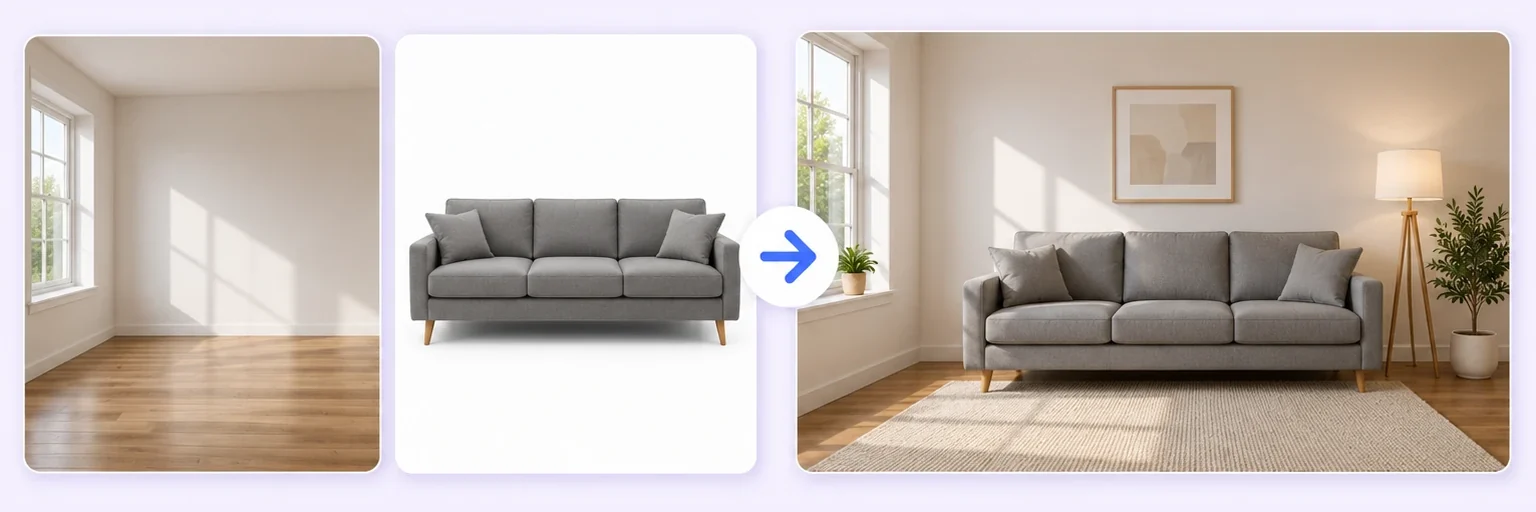
Stop guessing. Start seeing.
Will that couch actually suit your living room? Upload the product photo and a photo of your room — AI places it there with real scale, shadows and light.
Stop guessing. Start seeing.
Drop in 2–8 pictures — merged instantly on your device, never uploaded.
📸 Drop 2–8 photos here, or click to choose
JPG, PNG or WebP · merged instantly in your browser · nothing is uploaded anywhere
Side-by-side, grid or collage — tweak spacing, corners and size live.
Full quality, no watermark — the button turns green when ready.
One photo + the options below works great — add 2+ when you want to truly merge people or images.
✨ Drop 1–4 photos here, or click to choose
One photo: change outfits, hair, background, or see your future baby · Two+: merge people and scenes into one picture
One tap sets everything up — 23 styles, each with its own quick options.
Pick a scene, lighting and quality — or just describe what you imagine.
Standard 1K costs 1 credit. 2K costs 2 credits and 4K costs 4 — you’ll be asked to confirm before a bigger image is generated.
10–40 seconds. Failed merges never cost a try or a credit.
No key yet? Get a credit pack — your key is shown on screen the moment you pay (and emailed as a backup). Credits never expire.
Your free daily blend and your credit key work on every one of them.
 Restore & Merge Old PhotosRepair a damaged photo, then merge generationsTry it free →
 Memorial Photo MergeA gentle photo together with someone you lostTry it free →
 AI Face MergerBlend two faces into one realistic faceTry it free →
 Wedding Photo MergePut the guest who missed the group shot back inTry it free →
Under Add 1–4 photos, drop two photos onto the box or click to choose. A photo of the furniture or decor item first (a screenshot from a shop works), then a photo of your room.
The ✨ AI Photo Blend tab opens automatically with the 🛋️ Furniture in room style already selected. Add "against the left wall" or "under the window" in the description box to place it precisely.
Press ✨ Blend with AI. The result appears in about 10–20 seconds; failed generations are never counted.
Press ⬇️ Download result (no watermark) or 📤 Share. Not quite right? Change one thing and blend again.
💡 Tip: Photograph the room from where you would normally stand — the scale comes out right.
Everyone has bought furniture that looked perfect online and wrong in the room. Color that clashed, a size that overwhelmed the space, a style that never belonged. AI Room Preview ends the guesswork: save the product photo from any store listing, take one photo of your room, choose Furniture in room, and see the piece sitting in your actual space — correct size, matching light, believable shadows.
An empty room photographs badly. Buyers struggle to judge scale in an unfurnished space, and listings with staged photos hold attention for longer. Traditional virtual staging costs money per photo and comes back a day later; this does it from the listing photo you already have.
Photograph the room from a corner so two walls are visible, with the curtains open and the lights on. Then add a furniture photo — a sofa, a bed, a dining set — and describe the placement: “place this sofa against the left wall, in scale with the room, matching the daylight from the window”. The result keeps your room exactly as it is and adds only the furniture.
Disclose it. Most property portals and estate agency bodies require virtually staged photos to be labelled as such. Add “virtually staged” to the caption — it is a rule in many markets, and buyers react badly to discovering it on the viewing. Never use staging to hide a defect: remove nothing, add only furniture.
Free forever. No watermark. No account. It just works.
Start merging →Save the product photo from the store listing, upload it with a photo of your room, choose 'Furniture in room', and the AI places the piece in your space with realistic size, shadows and lighting.
No — just two ordinary photos. It works from any browser on any phone or computer, no app install, no room scanning.
Yes — describe the spot in the prompt ('against the far wall', 'under the window') and regenerate. Each variation shows a different placement.
The AI matches scale using visual cues in both photos, which is realistic for judging look and fit — but always check the listed measurements before buying.
Everything on AIMerger brings things together — here is what pairs with this one.