⚡ Quick answer: Scroll down to the tool on this page — the AI Photo Blend tab opens with 👨👩👧 Group photo selected. Upload up to four individual photos and press Blend with AI. For five or more people, build the picture in rounds, as explained below. You can also use the AI Group Photo Generator page.
When a group photo from individual photos makes sense
- Remote and hybrid teams that never share an office — a team picture for the website, a farewell card or an annual report.
- Family reunions where relatives live in different cities — see the family reunion photo tool.
- Weddings and graduations where someone couldn't be there on the day — see merging wedding photos.
- Class reunions, clubs and sports teams that need one picture for a poster, newsletter or social post.
Step 1: Collect and prepare the individual photos
Consistency between the photos is what makes the final group shot believable. Before you merge anything, check that every picture has:
- The same framing — ideally waist-up, facing the camera, taken from about arm's length or a little further.
- Similar light — soft daylight near a window works for almost everyone and avoids harsh shadows.
- A clear face — no sunglasses, caps pulled low or heavy filters.
- Enough resolution — original phone photos, not screenshots or images saved from a chat app.
💡 Collecting photos from a group? Send everyone the same one-line brief: “Waist-up photo, facing the camera, near a window in daylight, no filters.” It improves the final result more than any setting.
Step 2: Create the group photo with AI
- Open the tool further down this page, or the AI Group Photo Generator — nothing to install.
- Make sure the ✨ AI Photo Blend tab is open.
- Upload the individual photos — up to four in one blend.
- Tap the “👨👩👧 Group photo” style (pre-selected here). It asks the AI to combine everyone into one realistic group shot with natural poses and consistent lighting.
- Set the scene and shape. Pick a scene such as a bright photo studio, a green park or a wedding venue, and choose Wide 16:9 or Landscape 4:3 so nobody gets squeezed out of the frame.
- Describe the arrangement if it matters: “two standing at the back, two sitting in front, everyone smiling, close together”.
- Press Blend with AI, compare a couple of variations and download your favorite — no watermark.
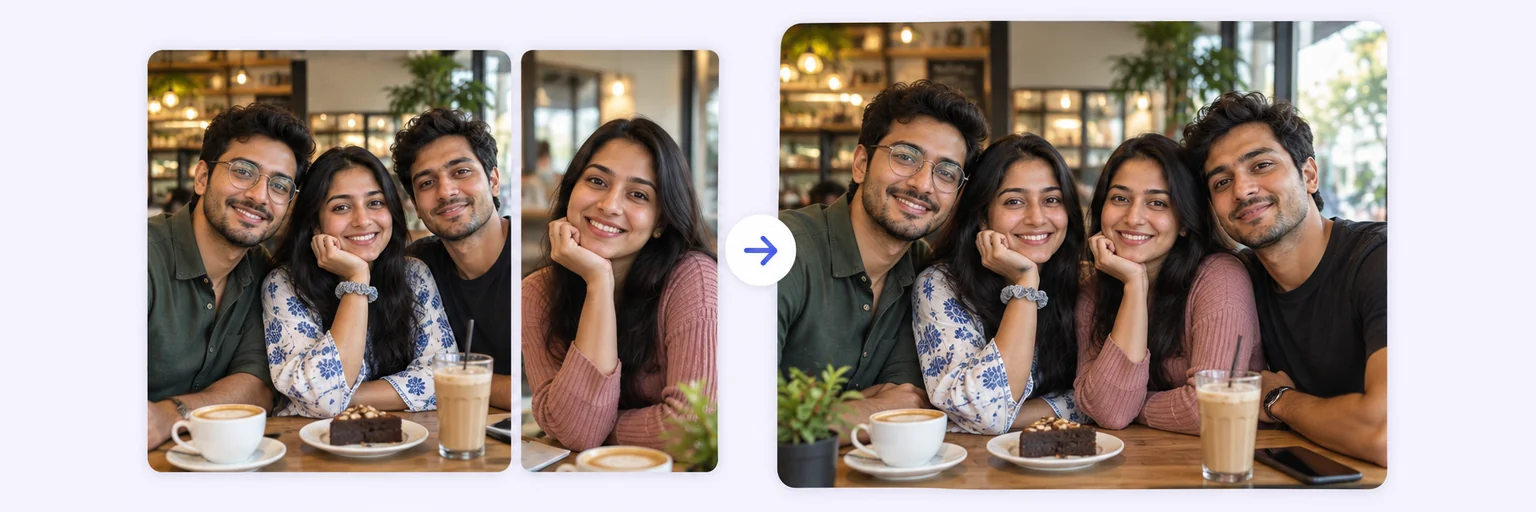
Groups of five or more: build the photo in rounds
Each AI blend takes up to four photos, so bigger groups are built in stages:
- Blend the first four people into a group photo and download it.
- Start a new blend with that group photo plus up to three more individual photos, and describe what you want: “add these people to the group, standing in the back row, same lighting”.
- Repeat until everyone is in, keeping the same scene description each round so the background stays consistent.
Every round is a fresh generation, so check that people added earlier still look like themselves before moving on. For very large teams — ten people or more — a tidy grid (below) is often the better and fairer choice.
Free alternative: a grid collage of individual photos
For a “meet the team” page, a class slide or a reunion invite, a clean grid can look more professional than a composite — and it's completely free.
- In the tool below, switch to the 🖼️ Free Layout Merger tab.
- Drop in 2–8 photos.
- Choose 2-column grid or Auto collage, then set spacing, rounded corners and background color.
- Download as JPG, PNG or WebP — no watermark, and the photos never leave your browser.
Tips for a natural-looking group photo
- Ask for closeness. “Shoulders slightly overlapping, standing close” — gaps between people are the quickest giveaway.
- Mention heights. Tell the AI who is tall or short so the arrangement feels real.
- Keep the background simple. Studios, parks and living rooms produce more natural results than busy streets.
- Choose a wide shape for four people or more.
- Check the details — hands, glasses and the edges of the frame — before you share or print.
- Need to add just one missing person to a group photo you already have? Follow how to add a person to a photo.
🤝 Good practice: get everyone's OK before sharing a composite group photo, and mention that it's a composite when you use it for official purposes such as a company website or press release.
The tool is below. Free tries every day, no signup.