What makes an added person look real
People spot a pasted-in person in a split second. Three things give it away — and a convincing result gets all three right:
- Scale and perspective. The person has to be the right size for where they stand, seen from the same camera height as everyone else.
- Light. The direction, color and softness of the light on their face must match the rest of the scene.
- Contact and shadow. Feet on the ground, a shoulder partly behind someone, a soft shadow underneath. People who “float” look fake.
Choose the right photo of the person
- Match the framing to the space. Use a full-body photo if they'll stand in a wide scene, and a waist-up photo for a close group shot.
- Match the camera angle. An eye-level photo fits most scenes; a selfie taken from above rarely does.
- Clear face, good light — no sunglasses, strong filters or motion blur.
- A simple background helps the AI separate the person cleanly.
- Mind the outfit. Beach clothes look odd at a wedding — pick a suitable photo, or describe the outfit you want.
How to add a person to a photo with AI
- Open the tool below, or Add a Person to Any Photo, in your phone or computer browser.
- Make sure the ✨ AI Photo Blend tab is open.
- Upload in the right order: the photo of the person first, then the photo you want to add them to.
- Tap the “🏞️ Person into scene” style (pre-selected here). It places the person from the first photo into the scene from the second, matching perspective and light.
- Say exactly where they go: “standing on the left next to the woman in the red dress, arm around her shoulder, smiling at the camera”.
- Press Blend with AI and compare a couple of variations. For photos with many faces, set Quality to 💎 Best — 2K (2 credits) so every face stays sharp.
- Download — full quality, no watermark.
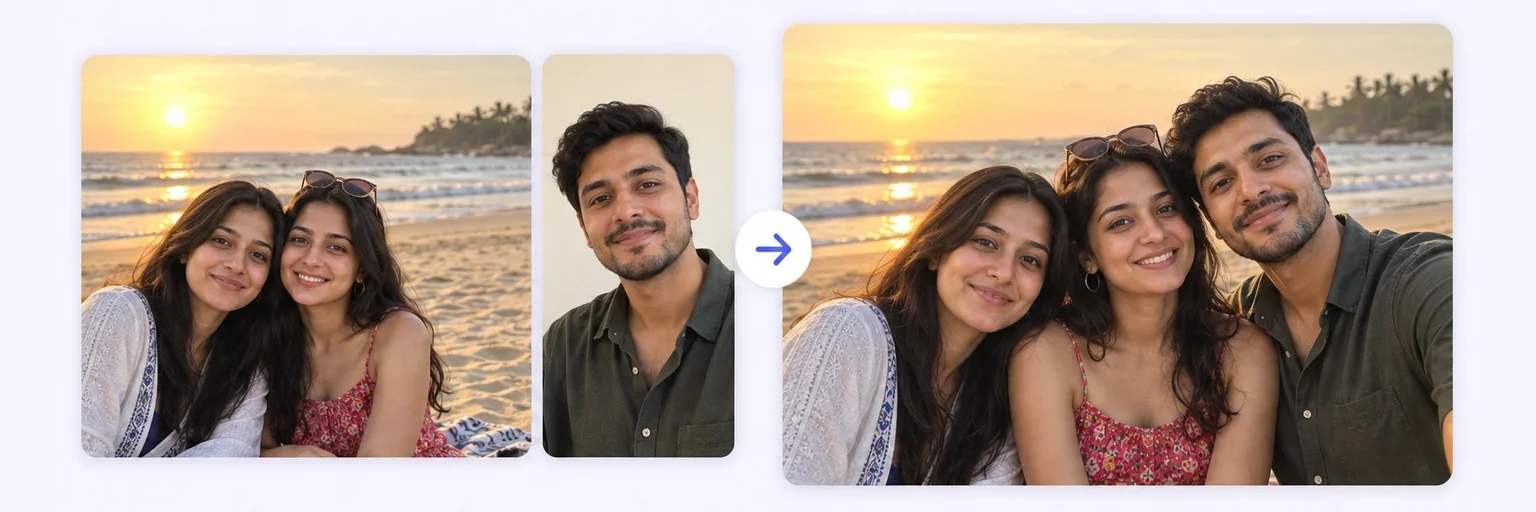
Adding a missing person to a group photo
The most common request: someone missed the family picture, the team photo or the wedding group shot. Use the group photo as the scene and be specific about the gap — “add him in the back row between the two tallest men, at the same height as them”. For weddings specifically, merge wedding photos is set up for exactly this.
Check the other faces afterwards. The AI rebuilds the scene around the new person, and in busy group photos it can subtly change people who were already there. If that happens, try again, or crop the group photo closer to where the person will stand before uploading. Building a group photo from scratch? Follow the group photo guide instead.
The manual method (Photoshop, GIMP or Photopea)
- Cut the person out with a selection tool and clean up the edges — especially hair — with a layer mask.
- Place them on a new layer and scale them so their eye line matches people standing at the same distance.
- Match color temperature and brightness with curves or levels.
- Paint a soft contact shadow under their feet and wherever they overlap someone.
- Match sharpness and grain — add a touch of blur or noise if the scene is softer than the cut-out.
Depending on hair and overlaps, budget anywhere from 30 minutes to a few hours.
Common mistakes
- Wrong perspective — a person photographed from above dropped into an eye-level scene.
- Mismatched sharpness — a crisp person on a soft, blurry background.
- Light from the wrong side — the face lit from the left while everyone else is lit from the right.
- Floating feet — no shadow where the person touches the ground.
- Ignoring overlap — in a crowd, the added person should be partly behind or in front of others, not neatly beside them.
The tool is below. Free tries every day, no signup.