Example: one photo, one tap

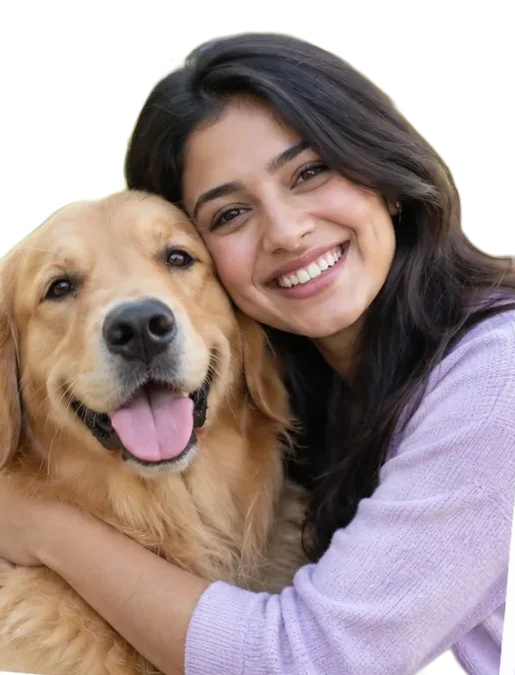
Made with this tool from one of our own demo photos, with no manual touch-up. The checkerboard shows where the picture is transparent.
Remove the background from any photo in seconds. The AI cuts out the person, pet or product, you touch up the edges, and you download a transparent PNG — or the same cut-out on white or any colour. Free, no signup, and your photo never leaves your device.
People, pets, products, cars, food — one clear subject works best. Processed on your device.
✂️ Drop a photo here, or tap to choose
JPG, PNG, WebP or HEIC · you can also paste a screenshot (Ctrl/⌘ + V)
⚡ The first photo downloads the AI once (about 56 MB) — after that it is saved on this device and starts instantly.
Erase leftovers, restore anything missing. Hold “Original” to compare.
Tip: choose Erase or Restore, then paint over the picture. Scroll with ✋ Move.
Transparent PNG, white or any colour — full resolution, no watermark.
Free · no sign-up · no watermark · your photo never leaves this device · remove the AI from this device
Tap the box and choose a photo (or drag one in, or paste a screenshot). The first time, the AI downloads once — about 56 MB.
Wait a few seconds while the AI finds the subject. The background disappears and you see a checkerboard behind the cut-out.
Touch up if needed: 🧽 Erase removes leftovers, 🖌️ Restore brings back missing bits, 👁 Original shows the photo you started with.
Keep Transparent or pick White or a colour, then press ⬇️ Download PNG.
💡 Tip: For product photos on a marketplace, choose White, set Edges to Crisp and tick Trim empty space — you get a clean, centred product shot.
Made with this tool from one of our own demo photos, with no manual touch-up. The checkerboard shows where the picture is transparent.
This tool does one job: it removes the background and leaves just your subject, as a PNG with a transparent background (or on white or any colour you pick). That is what you need for stickers, logos on slides, product photos, profile pictures and collages. If you want a whole new realistic scene behind you instead — a beach, an office, a studio — that is a different tool: the AI Background Changer.
The first time you use it, your browser downloads an open-source AI model for finding the main subject of a photo (IS-Net, Apache-2.0 licence), about 56 MB including the engine that runs it. It is saved in your browser, so the next photo starts straight away. Your photo is analysed inside your own browser and is never uploaded — you can even switch the connection off once the AI is saved.
The AI works out the subject at 1024 × 1024 pixels and the mask is then fitted to your full photo, so the download keeps your original resolution (up to about 16 megapixels in the browser). On a computer this usually takes a few seconds; on a phone, about 5–30 seconds.
Add a photo above. The AI finds the subject and removes everything else, then you can touch up the edges with Erase and Restore and download a transparent PNG.
Yes. It runs on your own device, so there are no credits, no signup and no daily limit, and the download has no watermark.
No. The AI runs inside your browser and the photo never leaves your device. The only download is the AI itself (about 56 MB, once per device), which is then kept in your browser.
The first time, your browser downloads the AI (about 56 MB). After that it is saved on your device, so later photos start straight away and work even with a weak connection.
Usually a few seconds on a computer and about 5–30 seconds on a phone, depending on the phone. Big photos and older phones take longer.
Yes. Choose White (or any colour) under Background before you download. Transparent PNG, white JPG and coloured backgrounds are all free.
Use Restore to paint back anything that went missing and Erase to wipe away leftovers. Undo steps back one stroke, and Reset returns to the AI result.
This tool cuts the subject out and gives you a transparent or plain background. The AI Background Changer creates a whole new realistic scene behind you.
Cut-outs pair well with these.